
Download Aispect – AI‑Powered Live Audio Visualizer, Free Credits, Secure & Fast
Overview
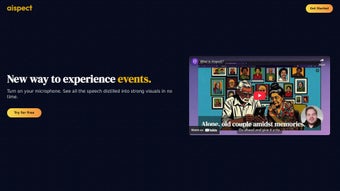
Aispect is a cutting‑edge web application that transforms live audio streams into striking visual representations in real time. By harnessing advanced artificial intelligence, the platform captures spoken content during webinars, virtual meetings, podcasts, or any live event and instantly generates engaging graphics that highlight key points, trends, and sentiments. The tool supports more than 30 languages, making it an inclusive solution for global teams and multilingual audiences.
Unlike traditional transcription services that merely provide text, Aispect adds a visual layer that helps participants retain information faster and keeps viewers visually stimulated throughout the session. The service operates on a credit‑based model, allowing users to purchase or receive credits that never expire, providing the flexibility to generate visuals whenever needed without the pressure of monthly quotas. Aispect places a strong emphasis on data privacy – no audio recordings are stored on the server, and only the final images are retained for the user’s download.
Payments are processed securely through Stripe, and new users receive a complimentary bundle of credits to test the platform risk‑free. Whether you are a presenter looking to enrich your slide deck, a marketer aiming to create shareable content, or an educator wanting to visualize lecture highlights, Aispect offers a seamless, secure, and highly customizable way to turn spoken words into compelling visual stories.
Key Features & Benefits
- Real‑time visual generation: Converts live audio into graphics within seconds, keeping the audience engaged.
- Multi‑language support: Recognizes and processes speech in over 30 languages, including English, Spanish, Mandarin, Arabic, and more.
- AI‑driven summarization: Highlights essential discussion points, trends, and sentiment without manual editing.
- Credit‑based usage: Flexible, non‑expiring credits let you generate visuals on demand; multiple subscription tiers suit individuals and enterprises.
- Privacy‑first architecture: No audio files are stored on the server; only the final visual assets are retained for download.
- Secure payment processing: Integrated Stripe gateway ensures encrypted transactions and compliance with PCI standards.
- Customizable visual styles: Choose from a library of templates, color schemes, and animation effects to match your brand identity.
- Export options: Download images in PNG, JPEG, or SVG formats, or embed them directly into presentations, blogs, or social media.
- API access: For developers, an API endpoint enables automated visual generation within existing workflows.
- Free starter credits: New users receive a set of complimentary credits to explore the platform before committing.
Why Aispect Stands Out
While many transcription tools focus solely on converting speech to text, Aispect adds a visual dimension that amplifies comprehension and recall. The AI models behind Aispect are trained on large multilingual corpora, ensuring accurate keyword extraction even in noisy environments. Moreover, the platform’s credit system eliminates the “subscription fatigue” common with SaaS products—users only pay for the visuals they need, and unused credits roll over indefinitely. The privacy‑centric design is especially appealing for corporate users who must comply with GDPR or other data‑protection regulations, as no raw audio ever touches persistent storage. Finally, the ability to embed generated graphics directly into live streams or post‑event marketing materials streamlines the content creation pipeline, saving time and reducing reliance on external designers.
Installation, Usage & Compatibility
How to Get Started
Getting started with Aispect is straightforward because it is a web‑based application that runs in any modern browser. Follow these steps to begin visualizing your live audio:
- Visit the official Aispect website and click the “Sign Up” button.
- Complete the registration form using your email address or social login (Google, Microsoft).
- Verify your email if prompted, then log in to the dashboard.
- Claim your free starter credits from the “Credits” tab.
- Navigate to “Create New Visual” and select the source of your audio (microphone, system audio, or uploaded file).
- Choose a visual template, language, and any optional style preferences.
- Press “Generate” – Aispect will process the audio in real time and present the visual output.
- Download the image or copy the embed code for immediate use.
System Requirements & Operating Systems
Because Aispect is hosted in the cloud, it works on any device with an up‑to‑date web browser. The officially supported environments include:
- Windows 10, 11 (Edge, Chrome, Firefox)
- macOS Monterey, Ventura (Safari, Chrome, Firefox)
- Linux distributions with recent versions of Chrome or Firefox
- Android 9+ (Chrome, Firefox)
- iOS 13+ (Safari, Chrome)
No additional software installations are required; all processing happens on Aispect’s secure servers. For optimal performance, ensure a stable internet connection (minimum 5 Mbps) and grant microphone access when prompted.
Best Practices for Accurate Visuals
To maximize the quality of generated visuals, consider the following tips: speak clearly and avoid excessive background noise; use a dedicated microphone or headset; if possible, enable automatic gain control; and select the correct language before starting the session. For multilingual meetings, you can switch language settings on the fly, and Aispect will adapt its keyword extraction accordingly. Additionally, using the “Template Customizer” to align colors with your corporate brand helps maintain visual consistency across all assets.
Pros, Cons & Frequently Asked Questions
Pros
- Instant visual feedback during live sessions.
- Supports 30+ languages, ideal for global teams.
- Credit system offers flexible, non‑expiring usage.
- Strong privacy guarantees – no audio storage.
- Secure Stripe payments and free starter credits.
- Customizable templates and export formats.
- API access for developers and automation.
Cons
- Requires an internet connection; offline use is not available.
- Advanced template customization may need a learning curve.
- Credit pricing for high‑volume users can become costly.
- Limited to visual output – no built‑in video generation.
FAQ
How does Aispect protect my audio data?
Aispect processes audio streams in memory and never writes raw recordings to permanent storage. Once the visual is generated, the audio is discarded, ensuring that only the final image remains on the server.
Can I use Aispect for prerecorded audio files?
Yes. In addition to live microphone input, you can upload MP3, WAV, or OGG files. The AI will analyze the recording and produce visuals as if the audio were streamed live.
What happens when I run out of credits?
When credits are depleted, you can purchase additional bundles directly from the dashboard. Credits never expire, so any unused balance remains available for future sessions.
Is there a limit to the length of audio that can be processed?
Each visual generation consumes a fixed number of credits based on audio duration and template complexity. Longer sessions simply use more credits; there is no hard time limit imposed by the platform.
Do I need any technical expertise to integrate the API?
The Aispect API follows standard REST conventions and includes comprehensive documentation with example code snippets for Python, Node.js, and Java. Basic familiarity with HTTP requests is sufficient to start automating visual generation.
Conclusion & Call to Action
Aispect fills a niche that traditional transcription and presentation tools have long ignored: the seamless conversion of spoken content into visually compelling graphics in real time. Its AI‑driven accuracy, extensive language support, and privacy‑first architecture make it an attractive option for educators, marketers, remote teams, and event organizers who want to keep audiences engaged without sacrificing data security. The credit‑based pricing model provides flexibility for occasional users while still scaling for enterprise‑level demands, and the free starter credits lower the barrier to entry. If you’re looking to add a dynamic visual layer to your webinars, virtual meetings, or live podcasts, Aispect offers a secure, easy‑to‑use solution that can be accessed from any device with a browser.
Ready to transform your audio into eye‑catching visuals? Download Aispect now, claim your complimentary credits, and experience the power of AI‑enhanced visual storytelling for yourself. Your next presentation will never be the same.



.png)



